One of the biggest questions when you’re getting into virtual reality is “What type of PC should I get?” VR is driving the upper limits of the required technical specifications of the GPU and CPU, and an off-the-shelf solution may not have enough horsepower to drive a good VR experience at 1080p at 75Hz for DK2 and 1440p+ at 90Hz for CV1.
This podcast explores the biggest questions and tradeoffs for building your VR rig, and has lots of amazing insights shared by AltSpaceVR’s community manager and VR evangelist Cymatic Bruce, and Kite & Lightning‘s developer John Starr Dewar.
- This is Cymatic Bruce’s budget build for around $1100 using some salvaged parts from previous builds.
- This is what AltSpaceVR’s VR rig of “The Beast” was based upon for around $2100.
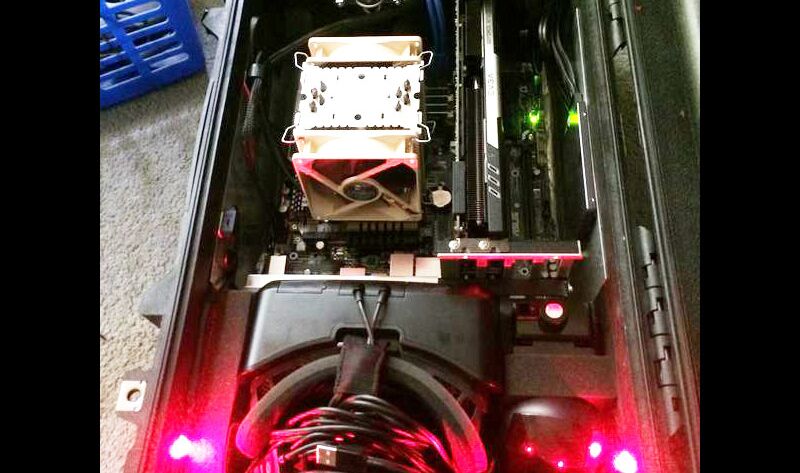
- This is the mobile VR rig within a Pelican suitcase that John built, which drove some interesting component decisions and a cost of around $2900. Here’s a photo set of John’s VR rig build
- I configured a Falcon Northwest Tiki with all of the high-end, recommended components along with a TB SSD & 2TB HDD, and the price was around $3,257. (I’m not sure if the motherboard would support an upgrade to 2 video cards when and if that becomes possible). EDIT: John says, “That’s a mini itx board so it can only take one card. They actually use an L-bracket adapter from silverstone so that the card will be mounted parallel to the motherboard instead of perpendicular to it as is normal. The case will only fit one card anyway. 600w is definitely more than you need. I have my card which is factory overclocked running at 106% tdp and I’m not having any power issues with the 450w.”

Here’s some of the questions that we tried to answer:
- What tradeoffs do you make when deciding to get for each component including CPU, GPU, motherboard, cooling system, storage, power, operating system, monitor, case, optical drive, and wireless network adapter?
- What’s the best machine that you can get for your money and still comfortably meet these specs?
- Should you go with the higher performance and more expensive Nvidia GeForce GTX 780 Ti 3GB GPU or the better bang-for-your-buck but less supported AMD’s Radeon R9 295X2? Spoiler alert: Most VR devs seem to prefer Nvidia, but the /r/buildapc subreddit seems to prefer AMD cards for the better performance per price but they may not know about the VR implications of going with something that’s not as well-supported.
- If you’ve never built a PC before, then how do you go about navigating all of the various tradeoffs between price vs performance and portability vs heat management?
Read more discussion on Reddit here.
This is Twitter thread I mentioned where I solicit advice for building a PC. Below are a lot of links and insights and additional feedback.
- OliverJT’s VR rig: Asus M8, Intel Core i7-4771, 16Go Corsair DDR3 2133, SSD Crucial M500, CPU Fan AXP-200R, GTX 780ti Phantom. >9Kg.
- Leonard Burton’s VR rig: Silverstone FT03 case, ASUS MAXUMUS IV GENE-Z, 3.3ghz i5, GTX780, Crucial M500 SSD, 16GB 1866 DDR3. Small build, handles vr nicely
- Proton Pulse/Vanguard V VR dev Justin Moravetz has a MacPro with a dual Fire Pro D700 rig with 12gb of VRAM in my Mac, but it’s not very common.
- This rig built by @gfodor is also close to what I’d get, but with Intel Core i7-4790K 4.0GHz Quad-Core Processor. He’s at AltSpaceVR, and this build is the precursor to what Cymatic Bruce was referring to as “The Beast.”
- Comparison between the Xeon processor that John Dewar went with and the Intel i7 4790K
- RedofPaw asks if there’s going to be a GPU that will top the 780Ti. It’s from 3 months ago, and Nvidia is about to come out with their 900 series. But the consensus seems to still hold true that the 780 Ti will be the best GPU out there for a while.
- Steam’s Hardware and Software Survey of the wider gaming community.
- Logical Increments shows a spectrum of component parts ranging from a destitute to monstrous budget
- Check AnandTech for the latest PC part tech news.
- The comparison pages that convinced me that the GPU performance of a self-built PC with the GTX 780 Ti was going to be far superior than the top-of-the-line, mobile GPU of GTX 880M.
- This was echoed by @ghostmachineVR who said, “Bought a laptop w/ 880m for demos, not up to the task. Returned it and built mini ITX rig w/ 780 works perfectly.” And he jammed it into a EVGA mini case.
@RedOfPaw @kentbye jammed it all into a evga mini case. Ready for Oculus connect, check! pic.twitter.com/Itcfd6l35a
— Ghost Machine (@ghostmachineVR) August 2, 2014
- eVRydayVR’s VR rig
- PC for VR by /u/Yshaana in UK prices
- PC build by octopusrift
- Tom’s Hardware Performance per dollar
- Tom’s Hardware FPS with various graphics cards
- The PC Perspective Hardware Leaderboard for top-of-the-line components in the dream system, high-end system, mid-range system and low-end system. Note that this is not VR specific. Their dream machine includes a 6-core i7-4960X & GK110-based EVGA GeForce GTX 780 Ti Superclocked GPU.
- PC battle station by /u/leostrauss
- A list of recent /r/buildapc threads about building a PC for DK2.
- PC built in Germany by @SchmidSven
Rough Transcript
[00:00:05.412] Kent Bye: The Voices of VR Podcast. Hello, and welcome to the Voices of VR podcast. Today, we're going to be navigating how to build a custom PC for virtual reality. There's no off-the-shelf thing that you can just go and buy at this point and have it be perfectly set up for virtual reality. So we're going to be talking with a couple of guests today about their experiences of building their own PC. So I'm joined here today by... Cymatic Bruce.
[00:00:39.259] Bruce Wooden: Hey, hey, hey. I am a VR evangelist, developer, and community relations over here at AltSpaceVR, which we will have more details about what we're doing very soon, but it's kind of a shared social VR space where there's lots of fun stuff you can do inside. So part game, part social experience, I guess, and bringing in the web into all of that as well, which is very cool. As a part of my role here at AltSpace, it's been a lot of troubleshooting DK2s, setting them up, We built a desktop over here that we call The Beast, and a whole slew of laptops that I'm dealing with as well.
[00:01:17.654] John Starr Dewar: And I'm John Dewar. I'm a developer and artist at Kite and Lightning, Sons of Peso fame. And I am kind of in Kent's shoes. I'm a lifelong Mac user, but VR is forcing me to leave that realm and get into the PC world for the first time. So I wanted a PC that I'd be proud of, so I built my own.
[00:01:41.088] Kent Bye: Nice. So as a Mac user for quite a long time, it's a little bit of a rude awakening, I guess, to realize that Mac is not really up to par with what you can do with the PC. You also have the dynamic where there's just a lot of demos that are Windows only, and I couldn't actually get Sense of Peso running on my Mac on boot camp, and that was Part of the reason why I started looking into like, oh boy, if I'm really serious about virtual reality, I'm going to have to consider building a PC. My first thought was, I'm just going to buy a laptop because I want to be portable. But then when I started looking at the video cards, there seemed to be a pretty big difference between what you can do with a portable laptop and what you can do with a custom-built machine. So Bruce, maybe you could talk a little bit, since you have been using laptops at AltspaceVR, What are some of the trade-offs that you found, and how good of a performance can you get with something that you just buy off the shelf as a laptop for virtual reality?
[00:02:39.958] Bruce Wooden: Yeah, it's pretty limited. So when I started out, I had a gaming laptop at the very beginning with the DK1. And the intention there was I was like, OK, it's going to be a pretty decent card that'll be able to push what I need. And I also was really about the social aspect, like when I was talking about founding SVVR and going out. experiencing VR with people, taking it places. So that was a really important factor. And I think I would argue that's pretty much the only reason why you'd want to get a gaming laptop for VR. If like being on the road and getting yourself out there, you know, traveling is a huge part of what you're doing and your game is maybe not pushing things to the limits, like as far as performance or it's very optimized, you can definitely do that. But yeah, I think with You know, the mobile discrete video cards are at the power level is just not there when you're talking about pushing things in stereo and trying to get them to a decent frame rate. It's just not quite there. So that's a piece of it. And also there's some complications you run into with these hybrid systems because, you know, heat is a big concern with the laptop. So they have the discrete video card, but they also use the onboard Intel graphics. And it's like sharing tasks between those two things. And so like actually configuring your machine to actually use a discrete video card and use it to its full potential. So that can be a little bit of a struggle as well. But yeah, definitely taking a performance hit there without question, if you're looking at a gaming laptop. And there's some gaming laptops out there like from Alienware and MSI have two video cards in them, like two 780Ms. But that doesn't really make a huge difference for you in VR right now. There's no optimized stuff for two video cards that are in SLI or Crossfire. So you're really not getting the benefit there of getting a really hugely expensive gaming laptop with two video cards. Yeah, your performance definitely is going to take a big hit and definitely got to have a strong reason for going that route, I believe.
[00:04:48.085] Kent Bye: Now with the dual video cards, I just want to hit on this right up front. Is this something that you expect that Oculus is going to eventually provide support for? Or why isn't that available already?
[00:04:57.747] Bruce Wooden: Yeah, I would expect that would happen sometime down the road. You know, I would assume, you know, it's kind of the dumb layman look at it like two video cards, two eyes. Perfect. Um, but like actually, you know, syncing all of that on the software side, it's, it's probably going to take a little bit deeper of a partnership with the video card creators, like when NVIDIA or AMD to really like optimize and get that going on to a level where everything's in sync and working together very, very well. I don't think it's not a trivial task to get that in, so I would expect to see it sometime down the line. I think it's definitely something that should be taken advantage of, but there's probably other priorities that they have right now for the SDK.
[00:05:42.427] John Starr Dewar: PAX over the weekend and spoke to somebody who had essentially unlimited resources to experiment with this stuff. They initially tried out the dual video card solution, but after a lot of R&D work, decided that the single GPU is the way forward. Unless the graphics card companies are really building specifically for VR, Single GPU might always be the way to go. I'm not sure what all of the technical reasons for that are.
[00:06:12.898] Bruce Wooden: Yeah, totally. I could see that. That could be totally possible. I don't know a whole lot about it, but I think a lot of it comes down to keeping things in sync. Everything has to be instantaneous between the left and right eye. So if you're talking about having one card render to the left and one card render to the right or something, to keep all that stuff in sync always, no matter what, That's definitely some work to the metal there.
[00:06:39.115] Kent Bye: Well, I think there's clearly some virtual reality specific considerations to take into account when you're building a PC. I think the Oculus subreddit is not taking on the mantle of giving a lot of PC recommendations for what to build. They're kind of sending people off to build a PC subreddit. But it seemed like that subreddit was a lot about how much bang for your buck can you get and you do Comparisons between like AMD versus Nvidia whereas Nvidia may be 75% of the market share But a little bit more expensive, but technically the highest quality or fastest cards what I found to be the GTX 780 Ti and And then there's comparisons to like an AMD version, which may be a better bang for your buck. But what are some considerations when you're looking at virtual reality? When you're looking at these types of decisions, how is one supposed to navigate whether or not they should go for the most expensive NVIDIA, the fastest, the best one, or if they want to take a risk with something like AMD, which may not be used as much?
[00:07:41.420] John Starr Dewar: I think right now, just speaking from our perspective, we have very limited resources to optimize this stuff, and I think that kind of bears out. We put out DK2 version of Senza Peso yesterday, and a lot of people with AMD cards were not getting 75 FPS. And there's obviously things that could be done to make that demo more optimized to run on lower end cards, but we do not have the resources to do that. And I think probably a large number of developers are NVIDIA first. I mean, obviously this is the problem with Macs. You know, the only Macs that could possibly run that demo are Mac Pros, and how many of those are there out there? you know, it makes it not worth the effort to support them. So I think that's the thing. I think a lot of developers are NVIDIA first, and I think that's partly because the NVIDIA drivers are more stable than the AMD drivers, and it's just less hassle for you when you're working. You know, you don't have to deal with anything like that. So that makes it more attractive to go with the 780s. And so I think for that reason, that kind of makes it the ideal card for VR because everyone's working in very limited resources. And for these like early demos that are going out, there's no real monetary benefit or, you know, no business sense in supporting every card that you can right now. It's just get the stuff out there and show it to people. And that's kind of what we're doing in terms of, you know, what we can justify spending time on.
[00:09:12.867] Bruce Wooden: Yeah. Yeah. That's some great, great points. I think from the side of when I was building my own personal desktop, when I moved from laptop to desktop, I think performance was king for me. So I use PC part picker and build a PC, the subreddit, but I also, you know, Tom's hardware, which is one of the best places to actually get that comparison and kind of hierarchy charts of performance. They do that for CPU, for GPU, kind of like price versus performance layouts and lots of data visualization there, which is very good. And that's kind of how I went about building, you know, my desktop. I was definitely on a budget, but, you know, NVIDIA kind of just was the choice because it was like, you know, I want the best performance because we were talking about, you know, rendering, you know, something in stereo. You just need as much as you can get on the performance side. So, yeah, I think that's kind of what drove my choice performance first. And especially early on, I mean, this is VR is going to be game focused. And here at Altspace, I mean, we're focusing on an app that, you know, we're considering gamers, but we're trying to think of the long game and like what everyone is going to be using. So we want our stuff to work on a MacBook. We want our stuff to work on like, you know, a lower end down the line. But yeah, we're in the same boat. We're looking at like the early adopters and the first people that are going to have this when we put ourselves out there, this is what they're going to have. And how do we get that 75 frames a second? How do we get that performance and optimize for that with what, you know, most of our user base is going to have? So that's definitely a factor.
[00:10:45.763] Kent Bye: And Bruce, since you are at Altspace, I know that when you did a bunch of troubleshooting tips for getting your DK2 set up, you had mentioned that you had at least 17 different VR rigs at Altspace. And I'm curious if you have a mix of AMD mixed in there so that that's part of your kind of QA process to take that into account as well.
[00:11:07.326] Bruce Wooden: Yeah, currently not yet. Uh, we're planning on building a, an AMD based system, but so far, you know, all, I mean, the MacBook pros leave our NVIDIA based. We have the razor blade 13, which is also NVIDIA based. Then the desktop we have is seven 80 TI. So it's like pretty much everything we have in the office. It just, as it turned out was NVIDIA. Uh, so we kind of brought that up like, Hey, we don't have any AMD stuff in here. We need to build a system for AMD. So that's going to happen. within the next couple of weeks. But yeah, a lot of our troubleshooting, what we've done so far, has been on NVIDIA, because we were trying to go with what most people out there were running on.
[00:11:45.789] Kent Bye: And let's talk a little bit about the specs that we're trying to hit. It sounds like with DK2, it's 1080p, and then you're also doing 75 hertz, but CV1 could be as high as 1440p and 90 hertz. So, you know, when you're looking at choosing a GPU, how are you kind of gauging whether or not a card is going to be able to drive that type of performance? What type of specs do you need to look at?
[00:12:19.471] Bruce Wooden: Yeah, like I'm going to go back and play Tom's hardware. In comparison to all the cards out there, like how are they handling as far as their benchmark tests, like FPS on some of the most popular titles out there on max settings or whatever. So that's definitely a factor, just pure performance specs and data that you can get there. I think also it's important to, you know, make sure you choose a motherboard, you know, and kind of look at the future. Like, you know, I want a motherboard that's going to have some good performance. That's also going to be down for the long haul as well. You know, if the CV1 is going to do this 90 frames a second, 1440p action, which 1440p is 77% more pixels, which is I mean, it doesn't sound like such a jump from 1080 to 1440, but it's a lot more resolution that's going on there that I think you're almost certainly going to be looking at an upgrade, if not when the CV1 comes, it may be shortly thereafter. And you want to be ready to be able to plug in the next best performing card and make sure everything that you have surrounding that video card is really in good shape and gaming focused as far as performance. So.
[00:13:30.800] John Starr Dewar: I mean, I would say that it's kind of hard to imagine not supporting at least the 780Ti with CB1. Yeah, I would hope so. I got a sneaking bad feeling that that's going to be the baseline hardware for it. You know, moving up to 1080p, 75 Hertz, a lot of people who could comfortably run Sense of Peso on the DK-1 are no longer able to with these new specifications. So it's going to be up to the developers to cut down on the visual quality to get that new target. And so we're all going to have to make a long, hard decision about what that cutoff is going to be.
[00:14:11.830] Kent Bye: It seems like there's a number of different trade-offs that people will need to make. Either you're going to just buy the best possible parts out there and spend up to $3,000 to $4,000, or maybe $2,000 or $2,500 is enough to get the absolute best on all the different parts. Or you can get a good mid-range, the best that you can get for more of a tighter budget. And then maybe there are people who are trying to get more of a lower end where it's really budget. Or maybe there's yet another range where you want to focus on making it more portable rather than getting the highest quality stuff. So if there's temperature trade-offs and whatnot. From your guys' perspective, when you're thinking about this, how are you thinking about these different slots in terms of what types of machines that people should be thinking about building for virtual reality?
[00:15:03.078] Bruce Wooden: That's a great question. Yeah, I went about this process personally in two different kind of mindsets. My first mindset, my personal desktop was, you know, a budget. So I want to kind of get the best bang for the buck. And in that case, the most money went toward the CPU. and the GPU. So I got a relatively high performing Intel i5-4670K, which is on the kind of the top tier of gaming performance CPUs. And I got a GTX 760, which, you know, isn't the super top of the line. It's definitely not a 780Ti, but it definitely holds its own. And then I kind of went budget on everything else on the RAM, the motherboard. I salvaged an old case and reused it. I did bumping up to a 650 watt power supply. But yeah, a lot of the stuff, you know, everything else, I just tried to get the best bang for the buck. And most of the money went toward the CPU and GPU. Then when we built our machine here at Altspace, which the beast as it were, it was more let's get something that's really solid. But you know, it's not exorbitant, but it's pretty solid, like the typical computer gamer would have. And we ended up our machine being about a little over two grand. And it's not too heavy. I think that was also a factor there. We got like a micro ATX board, which is a little smaller. So we can like take that desktop, you know, and do demos and stuff, which is cool. But yeah, a lot of it was just kind of, again, going for the best CPU and best GPU. I think that was really the focus there. And then the motherboard was the Zeus Republica Gamers Maximus, which is really a decent motherboard as far as feature set for gaming specific performance. So. Yeah, I think it's definitely a combination of factors depending on what you want to do. I've seen some people do builds with like the really small motherboard so they can have a desk, basically a desktop power, but still have something they could lug to the meetup or lug to the trade show and not take up their whole suitcase. So it's definitely possible. And the smaller you get, the better cooling system that you want, I think. So you want to take a close look at that. But yeah, that's kind of my input there.
[00:17:17.266] Kent Bye: And Bruce, how much was your budget machine that you put together? What was the final cost on that? Do you know?
[00:17:22.588] Bruce Wooden: Oh yeah, the budget machine, what I end up paying initially, it was $1,000 actually, about $1,100. And I saved a lot because I mean, didn't have to get a monitor, keyboard, mouse, case. There was a lot of things I had kind of hanging around as a PC guy for a while. And I was able to really save. So that helped a lot. So the little things kind of add up when you really want a nice keyboard or nice this or nice that. You know, some stuff I had hanging around already. But yeah, it was about $1,100, between $1,000 and $1,100 all together.
[00:17:55.499] Kent Bye: I see. And what about you, John? When you were starting to put together your PC, what were some of the big considerations that you wanted to do?
[00:18:03.342] John Starr Dewar: Well, I was kind of coming off, we have this Cooler Master at the office, which you guys might have seen at SVBR. It's this humongous, full-size tower case that weighs a ton. It's almost impossible to move. And I was lugging that up and down stairs all weekend, taking it around, demoing it. And then after SVBR, again, you know, we were taking that computer around to demo and it was just terrible. So one of my chief, my very most important consideration was it has to be portable. Then, you know, because I'm a Mac user, the other considerations, it had to be quiet. It couldn't make a racket. That Cooler Master thing is like three hair dryers going at once. And the third requirement, which really kind of changed what I was going to do is, well, two things. One was, it's supposed to be a rendering workstation. So Akrima, who's one of the Kite and Lightning developers, he was very adamant that I should go with a full 32 gigs of RAM to do light baking. And the other consideration is he wants to have fiber channel installed at the office at some point. So I needed a board that would support that, either through Thunderbolt or through a fiber channel card. And that eliminated Mini-ITX from the equation. I mean, if I was recommending for somebody to do a portable computer, I think the Mini-ITX would be the way to go. And there's several really nice cases that are tiny and easily portable that fit that form factor. the EVGA Hadron, and if you can get one, the Encase M1 seems to be the very best design that I can see. But that wasn't an option for me, so what I finally decided to do, which might not have been the smartest decision, was to build it inside of a Pelican case. So the 1510 Pelican carry-on case with a Micro ATX board. So that was my approach. And I got to say, in the end, the thing's pretty great. I carry it home from work every day, no problem at all. It weighs 13, 14 pounds, but it's not a big deal. It's got nice handles, and you can roll it. So it's pretty good from that perspective. because it's a custom case, essentially. So the effort that goes into putting that together is pretty intense. And that's why I'm not sure I would recommend that other people do this, unless you have a lot of spare time or you just want to learn how to do that kind of stuff, which I kind of wanted to learn more practical skills. And so that was part of why I wanted to do it. But if you just want a computer that's portable, I would say go Mini-ITX. Awesome.
[00:20:54.927] Bruce Wooden: That pelican case madness sounds amazing. Did you cut holes in the case for ventilation? Tell me more about this mod.
[00:21:02.653] John Starr Dewar: That sounds amazing. It's actually very stable standing upright with the lid open. That's how I usually use it. It gets nice airflow from the bottom to the top and it doesn't need any extra fans. It's got the CPU cooler fans and the EVGA graphics card ACX cooler. You know, that's basically four fans. They're almost perfectly silent. You can't hear it when it's running even under load. The refrigerator is way louder and it stays cool. So I was originally planning to have some sort of a inner lid over the components, and then I would have had to add at least two more fans. But I think I've decided at this point that it's diminishing returns on effort. And I kind of like it the way it is. It's quiet. It runs well. I should probably just leave well enough alone.
[00:21:55.890] Kent Bye: It's epic. Wow. And John, one of the other decisions that you made is that you decided to go with the Intel Xeon 1231v3 processor rather than one of the other Intel processors, the i7. So I'm curious, in the decision-making process, why did you decide to go with the Xeon rather than Intel i7-4790?
[00:22:16.975] John Starr Dewar: Yeah, I mean, it's between this one and that 4 gigahertz i7. This one, you save some money. It doesn't have the integrated graphics, and it's otherwise an i7. And the main reason I wanted to go with it was, again, as a workstation, I wanted to have as many threads as I could get, as opposed to, for gaming, you might be more concerned about the clock speed you can achieve on lesser cores. So for me, having hyper-threading was important. I didn't want to overclock, and I was a little bit concerned that the 4GHz i7 would be too hot. So I can tell you now, that what I've got on it is a Noctua 93mm dual fan cooler, and that is plenty to keep it cool under any kind of normal usage. If you are doing Prime95 and stressing the cores out, it's just exactly enough to keep it stable temperature at about its maximum thermal design limit. So, I think under any kind of normal usage, I could have gotten away with the 4GHz, but still a little concerned that if I'm doing rendering, I'm probably better off with the Xeon that I bought. That was the consideration. And the other thing was just power on these SFX cases, small form factor cases. You need a SFX power supply and there's really only one that seems to be any good and that's the Silverstone 450 watt. So with that 780Ti in there and the chip I have, I'm kind of like a little bit close to the edge in terms of power draw. Supposedly, you know, the PC part bigger puts it at 441 watts and it's a little bit less than that in reality, but there's not a whole lot of headroom there. So I didn't want to push it too far.
[00:24:07.756] Kent Bye: I see. Yeah. And Bruce, you said that you went with a 650 watt power supply.
[00:24:13.280] Bruce Wooden: Yeah. Yeah, I did. I just kind of want to cover all bases there. It was kind of also a plan ahead as well. I was thinking about the possibility of going with two video cards in the future. So I just wanted to kind of be prepared for that and just kind of cover my bases, I guess. So yeah, that's why I went with the bigger power supply, trying to just be like, Oh, right. You know, I'm ready to upgrade.
[00:24:38.175] Kent Bye: I see. Yeah. It looks like PC part picker will give sort of a rough estimate for what your required wattage would be. Is that how you went about doing that in terms of just making sure that you had plenty of capacity?
[00:24:52.584] Bruce Wooden: Yeah, yeah, PC power picker is helpful in that way. And also, if you dig deeper into like the GPU information, it'll tell you like, oh, you know, this GPU requires, you know, such and such amount of power, like, was the 780 Ti is like 250 watts. So yeah, it was kind of a factor there. While I was just kind of going off of some information, like with the PC power picker, putting together a build and seeing like, okay, What that's about, I want to go over that and make sure I have no power issues at all with my rig.
[00:25:23.870] Kent Bye: OK. And I had a thread on Twitter where I was just trying to aggregate a whole bunch of links and people were replying to it. And one of the ones that came in from 20 milliseconds was this logicalincrements.com. And it has a really nice grid where it goes through all the different graphics, CPU, motherboard, RAM. And it goes from destitute all the way up to monstrous. But in terms of the CPU, let's talk a bit about that in terms of What are the considerations or what are the specs when you're thinking about buying the CPU? Which one should you go for?
[00:25:57.895] Bruce Wooden: Hmm, that's a good question Yeah, for me it was you know, I went off of all of the game performance data when it came to CPUs I kind of cover bases there. So that's what I based my decision on I've been an Intel guy for a long time back when I was doing my physics coursework and using Mathematica Intel handled Calculation is much better. And so I was in that camp early on, so I kind of have that bias there. But yeah, I think it also depends on the type of work that you're doing. You know, like, as a dev, you might have different requirements depending on what you're doing with that rig. If you're going to be spending a lot of time doing different types of activities, as far as graphics work, as opposed to simply just playing games, that might affect your decision, but I think mine, since I was mostly focused on just performance, it was the Intel i7, i5's high-end were what I was looking at pretty much.
[00:27:00.891] Kent Bye: John, when you think about the other people there at Kite and Lightning, what were some of the other thinking when it comes to choosing a processor?
[00:27:09.676] John Starr Dewar: I think the other guys are both using i5's. I think actually Crema has an i7. I think if we were choosing CPUs for ourselves, we would definitely go with the i7 or Xeon because we want those extra threads. But if I was choosing it for someone who's just a VR enthusiast and wants a good gaming rig, I think the i5 is the way to go right now. A little bit cheaper, you can overclock it, and you're not going to see much benefit from the extra threads right now.
[00:27:39.731] Kent Bye: I see. So that's more of a planning for the future type of thing to go with the i7.
[00:27:44.554] John Starr Dewar: Yeah, and there was a guy from Intel who came by the PAX booth, and he was like, I was at the Unreal booth, so he was kind of getting after the Unreal devs. He's like, guys, we're going with six, eight cores now. We're going to have 12 threads. We need to have all these optimized. But that's a chicken and the egg problem. If most guys with high-end rigs are using overclocked i5s, then developers are going to optimize for that.
[00:28:10.557] Kent Bye: John, since you guys are using Unreal Engine there, and I know a lot of people are also using Unity, is there any differences in terms of whether or not you plan on using Unity versus Unreal Engine in terms of what type of PC that you need to build or anything that you need to take into account there?
[00:28:27.481] John Starr Dewar: I think the thing, if you want to run Unreal demos, is that Unreal Engine makes it very tempting to use their built-in light baking tools and turn everything up to 11 because it's just super fun to work that way. But for an Unreal Engine demo to support lower-end hardware, we have to do more of the Unity workflow where we are pre-baking all of the lighting, turning off a lot of the awesome effects, and kind of being a lot more careful That takes away some of the advantages of going with Unreal Engine, at least for right now in this generation. So if you want to be an Unreal dev, just the editor itself is incredibly taxing on the computer. My MacBook Pro has no problem at all running Unity Editor in fairly complicated scenes, but it barely runs Unreal Engine Editor. Whereas on the new desktop, it's butter smooth and amazing. like the greatest thing ever to use the Unreal Editor. So definitely you want a beastly machine if you're going to be working in Unreal.
[00:29:35.032] Kent Bye: I see. Yeah, I guess that's a good point, that if you are grading Unreal Engine demos and you're kind of cranking it all up with your super tweaked out monstrous VR PC, then you're going to be introducing a world of hurt for a lot of people, it sounds like. And it seems like Senso Piso is one of those demos that is really pushing the limits in that way.
[00:29:56.753] John Starr Dewar: Yeah, I mean, that was kind of the point. It's supposed to push the limits, and it's supposed to take advantage of the much easier workflow with Unreal Engine, where you are using all the tools that they're giving you, and not so much relying on Maya and mental ray and everything to carry that load like you would with Unity. So the unfortunate side effect of that is people are going to need high-end hardware to run it.
[00:30:20.810] Kent Bye: Well, let's talk a little bit about the motherboard. I know, Bruce, you had mentioned this already, but I've heard that the CPU and the GPU are the two most important things, and then a lot of the other stuff could be almost commodity, where you could choose a wide range of different stuff. But what are some of the trade-offs that you're really looking at in terms of some of the specs of a motherboard?
[00:30:43.326] Bruce Wooden: Yeah, for me, it was looking toward the future. It's like, OK, does this motherboard have two graphics card support, like Crossfire and SLI. Like, will it support that in the future? I think that was, you know, an issue. Actually, also for me specifically, I would look at the USB ports and the 2.0, 3.0, how many it had with the number of VR peripherals. That was kind of a minor factor and I ended up getting an external hub anyway for that stuff. But yeah, VR just seems to come with a lot of accessories nowadays. And the ability for like what the motherboard maxes out its memory at. So that's a motherboard constraint. Some motherboards may only go up to 16 gigabytes, especially if you're looking at trying to get a smaller compact system and like an ITX type motherboard, you want to take a look at that. Will it go up to 32 gigabytes? I think eventually you want to be there. So that's a little bit of a factor as well. So yeah, I guess that would be the The things I looked at, I know, you know, back in the day, I'm not sure if this is as important anymore, but the onboard chipset, making sure it was like, you know, Intel based when I'm using an Intel chip, this was like something that was, you know, I'd built PCs for a while. So this is going back years and years when they had motherboards with different onboard chipsets and it would cause some issues there if you had an Intel chip and a chipset on the motherboard that was different. So making sure that's Intel based as well on the motherboard itself. But I don't know if there's even a lot of variety on that nowadays. I haven't kept up on that, but yeah, those are the things I kind of looked at. And there's some like by ASUS and MSI, they call them gaming focused motherboards. So there might be some other details and performance tweaks as far as, you know, communication buzz on the motherboard itself. That's kind of caters toward the gaming type functionality. But yeah, those are things I definitely look for, like dual memory card support, memory, maximum and what that looks like. And yeah, that's probably some of the biggest factors there.
[00:32:50.100] Kent Bye: For the beast that you built there at alt space, what's the motherboard that you ended up going with there?
[00:32:55.402] Bruce Wooden: We got an Zeus Maximus six gene. It's a micro ATX board, and it's part of this Zeus Republic of gamers line where they're making a lot of like gamer focused components for PCs. And it's micro ATX, so it's a little smaller. And I think the only difference between some of the bigger ones is that it loses a couple of SATA ports, I think. Maybe a couple of USB ports or something, but otherwise it's pretty much the same performance wise and feature wise. 32 gig maximum of memory. It's definitely got the SLI and crossfire support if we want to spring for that later. So yeah, it's a pretty decent one. That's pretty good reviews. Sometimes just going on Newegg and looking at the ratings is a good way too. If you're kind of going back and forth, a lot of people post on forums or they'll post specifics about their problems on Amazon or on Newegg, which is kind of a priceless resource there. Definitely want to check that out if you're going back and forth on any component, really. And the vocal people normally talk about the problems they have. So that's good to scope out.
[00:34:01.188] Kent Bye: Interesting. Yeah, what about you, John? Which motherboard did you end up going with? And what was some of your decision-making process there?
[00:34:08.232] John Starr Dewar: Well, that turned out to be the most stressful part to pick. And it was because out of all the hundreds of motherboards that are available, this was the only one that met my requirements. And it took a long time to find. And basically, the requirement was, I think I'm probably going to need Thunderbolt. And this was the only one with Thunderbolt, which To be honest, it upsets me a little bit, but I'll get back to that. So the one I got was the Griffon Z97 from ASUS, which seems really pretty ideal. It's ruggedized a little bit. And since I have a portable thing that I drag around by a handle, having a ruggedized motherboard seems like a pretty good plan. And it's really nice. You know, the EFI firmware is fantastic. It was super easy to set up. The instructions were excellent. I'm extremely pleased with it, and it's got Thunderbolt support, so I'm happy. Awesome. But, you know, Mini-ITX is so close to being ideal. These Micro-ATX boards do not come with the built-in Bluetooth and Wi-Fi, which is a shame, because the Wi-Fi dongles are terrible. They never really work. the Mini-ITX boards do, and the Mini-ITX boards only have one slot for the graphics card. So, to me it makes no sense that they are not available with Thunderbolt. And I found it rather disheartening that a lot of people on the boards that I was searching for this, it was like, Mini-ITX with Thunderbolt, and then there'd be all of these responses like, Why would you ever want that? Why do you want the stupid Apple-designed expensive thing? And I think it's kind of this culture that seems to pervade the do-it-yourself community that bang for the buck is it's more than just paying for the buck because these guys, a lot of them are paying like $15 for a single braided cable that looks cool. But it's about, it's kind of a mark of pride that you get the best value possible out of the components that you buy. And Thunderbolt does not kind of fit within that framework. So I don't know. I don't want to disparage anyone, but I just found that kind of odd. Why wouldn't I want a portable workstation that can connect all these high-end components? Why are these companies that are making motherboards all assuming that if I'm going to use Thunderbolt, I'm also going to want a full-sized ATX gigantic computer? What I really want is the PC equivalent of a Mac Pro, but that seems like something that doesn't exist and may never exist.
[00:36:50.862] Kent Bye: Yeah, that was the thing I noticed in the build a PC is that, you know, there was a whole thread on them recommending overwhelmingly the AMD because it was better bang for the buck. So I think that you have to take into consideration a lot of these outside of VR realms, there may be real implications in terms of not being as well supported, and you may be in for a world of hurt. One of the things that I found was really interesting was that Steam actually publishes this hardware survey that you can go look and see all the different percentages of what operating system and what graphics cards and all sorts of different hardware. It gives you a little bit of a map of the landscape. But again, that's still just gaming, so VR-specific things. It's kind of a new niche that is just growing. And right now it's pretty, frankly, painful to go through all this process. I want to just be able to go to a place and buy it and not even have to worry about all the details. But this is kind of where we're at right now is having to kind of get down to this low level of detail in order to put together this rig. So I'm imagining that over time this will be a lot easier. But this is kind of what we're at right now. I don't know if you guys had any thoughts on that.
[00:38:02.165] Bruce Wooden: Yeah, I think that's an interesting point that you make, Ken. I think, you know, like there's a lot of people that are interested in VR that are not going to want to dig through all this stuff. Like, you know, I dove back in for a long time. You know, I was a DIY PC dude and then midway through college I got a MacBook and then I got a gaming laptop and I didn't touch building PC stuff for years. You know, it was a thing I did when I was younger and it was very cool because that's what you needed. There's plenty of gaming experiences, especially when you're talking about Steam and Indie, that you can have a very decent gaming experience with a gaming laptop, and it's sweet, you know? But then once this VR stuff started to snowball and getting more enthusiastic, I mean, it was the impetus there to get back into this DIY desktop because it's necessary, but there's been a lot of people out there that Really excited about VR and they're gonna be like, well, yeah, what are you talking about? You know buses and hurts and I just want to play good VR, you know And when they're talking about possibly 90 frames a second and 1440p and all these crazy stats I think it might be a possibility that you know with the steam box or something similar maybe oculus produces their own hardware system. And maybe that's something that happens, you know, because I think if they're, you know, want everyone to have a great VR experience and they're pushing these type of stats, then it's a really rough case. I mean, do you just narrow your market down to just one to 2% of PC users that are going to have that super duper build? Or are you going to do something else to make it more accessible? And I think there's a lot of people that are just like you is like, you know what, I just want to go out and just buy a thing. I want to buy a box and have it work. And I wonder what's going to happen as a result of that demand.
[00:39:48.722] Kent Bye: Yeah, in terms of looking at the ones that were pre-built, I was looking at anywhere from $1,500 to $2,000 of a markup. Whereas if you were to build it yourself, it may be $2,000. But in order to buy it pre-built, it was anywhere from $3,500 to $4,000 to get something equivalent. And that was just like, wow. I don't know if there's services. If I bought all the parts, can you hire somebody to build it for you?
[00:40:14.998] John Starr Dewar: Yeah, there's actually a subreddit of people who will build your PC for you. Have you found that?
[00:40:21.140] Kent Bye: Oh, uh-uh. So it's kind of like geolocated based upon where you're at. People will actually build it for you?
[00:40:26.121] John Starr Dewar: I think you just go on there and say, hey, can you build me a PC? And then someone will say, sure, I'll do it for x hundred dollars.
[00:40:33.524] Kent Bye: Ah, I see. And then they ship it to you. Yeah. OK.
[00:40:36.825] John Starr Dewar: That's epic. In terms of pre-builts, the one that Oculus has been using for their demo stations. And at KNL, we just acquired four of these for a client project. It's the Falcon Northwest Tiki.
[00:40:51.042] Kent Bye: Oh, yeah.
[00:40:51.942] John Starr Dewar: And I don't know if you tried configuring that, but the price is fairly reasonable. And it comes with a bag of coffee. So there's that. Awesome.
[00:41:02.745] Bruce Wooden: Oh, I think I found this on what you were talking about on MetaReddit. It's build a PC for me. Yeah, and that's wild. I didn't know about that.
[00:41:14.534] Kent Bye: Well, let's go through some of the other big components here in order for people to kind of build out their PC. Let's talk about memory. In terms of memory, I know, John, you said you needed to go up to 32 gigabytes to do a lot of the stuff that you were doing. But what are some of the trade-offs and considerations that people should think about when deciding how much memory they should get?
[00:41:34.112] John Starr Dewar: Well, I think if you're just going to play games, you don't need that much. Like, to be honest, 16 gigabytes is going to last you a long time. So I wouldn't count out Mini-ITX just because it can only support 16 gigs. So you need to think about what you need to do, and game RAM usage is not going to be super, super high. 16 gigs should be plenty, I think. But if you're doing the workstation class work, all the RAM you can get, basically, is going to be best. So leaving it open is a good idea.
[00:42:10.177] Kent Bye: Bruce, how much RAM did you end up getting for the Beast and your own personal machine?
[00:42:15.080] Bruce Wooden: For the Beast, 30. No, actually, you know what? I think it went 16 for both. And I started with eight on my personal build and upgraded to 16. And that's done pretty well. Yeah, I would agree. Like 16 is doing great for the time being. And I would expect that to be okay for a while. You know, I always have been in the mind, I just always want to be ready to upgrade or make more room for RAM. So, you know, I think both machines that I've built here are able to upgrade to 32 and are ready to do that, you know, just in case we have some interesting stuff going on on the technical side. As far as getting these VR experiences and the SDKs to get working, I think, you know, we're all kind of, you know, looking at Carmack the Magician and, uh, and just waiting for some really cool breakthroughs to maximize performance on the PC side. And I think I always want to be ready to have maximum RAM there, but yeah, I think 16 is, is going to be good. And I agree with John. I mean, if you have an ITX. And it's capped at 16. I mean, the trade-off that you're getting in portability there is definitely going to be more than sufficient.
[00:43:24.849] Kent Bye: And Bruce, what was the thing that you were experiencing that was driving you to go from 8 to 16?
[00:43:31.611] Bruce Wooden: A lot of it was streaming. So I'm doing a lot of streaming of experiences. I'm running multiple applications. So for any given stream, I have a music player open. some kind of video player open. I have, you know, a text editor of some type. The browser is open, maybe with multiple tabs there. The stream software itself. And then on top of that, I'm running the game and I'm capturing the game, too. So after all that is said and done, yeah, I was definitely saw a little bit of a boost by getting that extra RAM and also an SSD hard drive. I got a little bit of a boost there in performance. by putting the operating system and some of those regular programs on a SSD to just get a little bit of a boost in performance there. You know, because again, like frame rate is so important in VR and it would be really horrible to try to do a three or four hour stream while trying to tolerate like a very low frame rate. Like I'll just be making myself sick over that three hours slowly. That's no good. So I'm looking for the best performance I could possibly get with all that stuff going on in the background.
[00:44:40.216] Kent Bye: I see. And it seems like in terms of storage, there seems to be a combination of using both a solid state drive and a regular hard disk drive that is not solid state. So should you use like a little bit of both in a combination or in terms of buying the storage and the hard drive space, what are some considerations that you were making in terms of what decisions you made?
[00:45:03.706] Bruce Wooden: Oh, yeah, I think it does go back to kind of, you know, budget as well. SSDs are not cheap at all. So defining an SSD that's big enough to get your operating system, maybe some of your key applications there, and then just having a big hard drive for like the games and all that kind of stuff. So I believe for my build on my desktop, personally, I went with SSD that was only 120 gigabytes. And then I have 1.5 terabytes of storage between my hard disk drives. I have a couple of hard disk drives in there. So like I put the games and pretty much a lot of the big programs like Unreal is huge. I also have Unreal Engine and do some a little work with it. And, you know, all of the stuff you get from the marketplace, all of the examples, I mean, all these things are multiple gigabytes each in some cases. So just getting all of that stuff. And having space for it is pretty key. I think we got a 256 SSD for the beast here in the office. And again, it's kind of the same model. We're really putting all of the demos and the games on the big drive we got and then operating system and some of the key applications that we'd like to use on the SSD. And that's kind of the way it's rolled so far.
[00:46:18.840] John Starr Dewar: Now, Bruce, is there any, do you know about fusion drive on Mac? Is there any kind of equivalent on the PC? Cause I haven't researched this.
[00:46:27.017] Bruce Wooden: Yes, on PC, it's what they call the relatively new, their hybrid drives. And they're basically a combination of SSD and a HDD, hard disk drive, all in one. And again, that's going to be, I think Seagate pretty much makes the best ones on the market right now, if I'm not mistaken. And there's the solid state hybrids where they're definitely not the cheapest, depending on what you're looking for. And I haven't got a lot of information as far as long-term performance. I know Seagate is hardly rated like on Amazon and Newegg right now, but I guess, you know, that's kind of my own skepticism and I kind of want to give it some time for those things. And when it comes to hard drives, I want to go with tried and true. So, yeah, but they're definitely out there and definitely an option and people have experienced success with them. So, yeah, yeah, that's maybe my next build. I think I'll go for that.
[00:47:19.887] John Starr Dewar: Yeah, I was lazy, you know. Hard drives are noise and heat and take up space, and I just decided I was going to get an SSD. Yeah. But coming from the Mac side, and maybe this is part of it, the SSDs are so cheap. Yeah. So I was like, oh, it's a great bargain. So I bought the terabyte Samsung Evo 840, and that's what I'm using.
[00:47:47.969] Bruce Wooden: Nice.
[00:47:50.428] Kent Bye: I see. Yeah, there's a quite a premium when you get the solid state on a Mac, I guess. So it's pretty cheap when you look at like $440 for that one terabyte. It looks like you got in your, your build. So, uh, let's just start talking about some of the other parts and pieces. Obviously you need some type of cooling. What type of considerations are you taking into account there when you buy your CPU cooler?
[00:48:12.149] Bruce Wooden: Ooh, yeah, that's a good one. There's definitely some considerations there. You know, price is again, rears its ugly head. That's always one, but there's some really good cooling solutions that are priced pretty well. Also the compatibility, one of those things like navigating the whole cooler situation is really doing a little bit of research to find out and make sure that that cooler is absolutely compatible with fitting on your chip and Sometimes you know, I've dealt with some coolers that will come with instructions that don't mention what they're compatible with But you look online and you find out they are so I did that with my personal build I got a pretty good cooling unit that didn't list that it was compatible with the i5 but it was And it fit and it was perfect. So yeah, that's could be one of the most complicated parts of your build the coolant system I mean if you're trying to go with something super fancy or like water-cooled or something just wild and you want to show off And even, I think probably the most complicated part of this build in the office was the fan because that came with all these brackets and it was compatible with all these type of chipsets and so forth. So yeah, there's definitely some factors there, but read some reviews. Like I think we got the Cooler Master Hyper 212 Evo, which is really on the cheap side. They're like 30, 35 bucks and they just put them right on the chip. It's a little bit of reading to make sure you've got the right clamps and you don't screw in things too tight, but it works pretty well. So yeah, I think the advice there is really read the reviews and make sure you've got some compatibility there. It's really the lesson I've taken away from dealing with cooling systems over the years.
[00:49:51.311] Kent Bye: What about you, John?
[00:49:52.392] John Starr Dewar: Well, I did talk to a lot of people who are adamant that I should go with liquid cooling, but I want to take my rig on an airplane, so I decided I didn't want to deal with the TSA asking me if my liquid cooler had less than two and a half ounces of water in it.
[00:50:09.148] Bruce Wooden: Oh my god, yes, that's such a good point.
[00:50:13.017] John Starr Dewar: So I had to go air cooled. And I think the biggest thing to consider, and this kind of comes back to the RAM issue, is that a lot of RAM has these crazy looking heat sinks sticking off the top. And there is less than a millimeter of clearance between my air cooler, or maybe it is exactly a millimeter. It's barely anything between the air cooler and the RAM. And I have low profile RAM. It has no crazy heat sink on it whatsoever. And I bought that specifically for that reason. I'm like, I don't need, like, Strange metallic devil horns on my RAM. It's just gonna get in the way So I think that's the biggest problem with an air cooler is that kind of clearance over the RAM because they are surprisingly big Mm-hmm.
[00:50:54.039] Bruce Wooden: Yeah hyper 212 is it's pretty tall. It's definitely very tall So depending on the kind of case and the kind of build you're doing that's definitely something to consider to how all the components are gonna fit next to each other and
[00:51:06.755] Kent Bye: And sometimes when I look at these PC part picker lists, there's this thermal compound. What is that used for?
[00:51:13.140] John Starr Dewar: So that fits in between your cooler has a plate. And that plate sits on top of the processor. And that's how the heat gets transferred from the processor to the cooling fins. But if you just stick the metal to metal, it's not really conductive enough of heat. So this thermal compound, you put a little dot in the middle of the plate. And then it spreads out and fills in that whole contact area, and that makes the heat spread efficiently from one to the other.
[00:51:43.563] Bruce Wooden: And it's an absolutely necessary component. If you don't use thermal compound of any type, because you would like the Intel i7s for example, like I did that I think one time when I was younger on accident. I forgot the thermal compound and put things together. And turn it on. And luckily the motherboard had a cutoff feature for the temperature. So it automatically will turn off once it exceeds a certain temperature there. So it, uh, you know, I heard up and was like unplugged everything and then there was smoke. Um, so, uh, this, it was definitely something you want. And, uh, like Arctic silver is the most popular brand of that has been using that for years. And that's never let me down. But yeah, that's definitely something you want to apply it carefully. Make sure not to get your fingerprints anywhere near it, like your finger oils will actually inhibit the conducting. So it'll interfere with the conductance air of heat. So yeah, that's definitely one of the most tender parts of the build there, making sure you have. a very clean application that is spread very thin and not messily and that you don't have any fingerprints on either side that just clean metal compound, clean metal, clamp it in. Then you've got some good temperature control there.
[00:52:58.176] John Starr Dewar: I was just going to point out the Noctua cooler that I have. came with its own little thing of thermal compound and extremely clear instructions. So it was kind of fiddly to do, but that was probably the easiest part of the build because the instructions were so good and they gave you everything you could possibly need.
[00:53:17.115] Kent Bye: I noticed that there's a wireless network adapter. That's something that's not a part of the motherboard. Maybe sometimes it is, but I guess in order to connect to the internet, you need a network adapter.
[00:53:27.622] Bruce Wooden: Absolutely. A lot of motherboards that are out there, they will have like an Ethernet port so it can plug right in, but they might or might not have onboard Wi-Fi. And even if they do, I mean, the quality of that onboard Wi-Fi might be, you know, something that you don't want to deal with, you know, and it's just so cheap relatively to get an external Wi-Fi adapter, something that actually plugs into the motherboard through the PCI Express port. And then, you know, have some pretty quality internet action there. So yeah, that seems to be kind of, I think I'm not sure if there's manufacturing reasons for it or economical reasons for it or what, but yeah, that seems to be an issue with the motherboards. I think even the one we, on both the motherboards I dealt with, that onboard Ethernet, but no Wi-Fi whatsoever.
[00:54:16.918] John Starr Dewar: I've got the, in my experience, At least with the Asus, the onboard Wi-Fi works great, but it's only available on the full-size motherboard or on the mini-ATX motherboard, but for some reason, just totally not on the micro-ATX. I don't know why. I wish it was there. That's the only thing I don't like about my motherboard.
[00:54:37.634] Kent Bye: In terms of buying a case, it seems like that's going to be a lot of drawing constraints in terms of how big and how portable everything is. So is that something that you choose a case first before you start picking all these other parts? Or at what time do you really start to think about what case to use?
[00:54:55.458] John Starr Dewar: I think first you look and you think, okay, the graphics card matters because some of them are longer than others, and some cases won't fit a 780Ti. And then you think about your requirements for the motherboard. For me, I had to go microATX. Otherwise, I would have definitely gone with a smaller case, a mini-ITX case, and saved myself all this trouble. And so once you kind of figure those two things out, you want to be able to fit a full size graphics card and do you need 32 gigabytes of RAM or the extra slots or what have you. And then that gives you, you know, whether or not you can go with the mini ITX or ATX or whatever. And then cost comes into it. You know, the micro ATX and full size ATX just seems to be, I think, just generally a little cheaper. Even the cases are bigger, but they tend to be a little cheaper. And it's easier to build a computer in a bigger case. You know, there's not as much hassle getting the cords in there and everything. So once you've figured all that out, then you can start to think about what case you want.
[00:55:53.721] Bruce Wooden: Yeah, totally spot on. Totally agree. It has to go in that order. Like, you know, you're looking at motherboard, video card, what kind of space am I taking up? And then from there, you're like, okay, that dictates what kind of case I'm going to need and let me choose my case. But the reason why those micro ATX and also ATX cases are cheaper, I think they're just much more common. And those mini ITX, they're more portable and they're less common, so they put a premium on those. I think it's kind of a supply and demand issue there with those cases. Yeah, sometimes, you know, that can totally vary. I mean, for here in the office and also my personal build, I mean, I had an old ATX case that I was able to use in the office here. We got just a kind of a standard Corsair micro ATX mid tower. So it was kind of straightforward. But for your personal build, depending on, you know, if you're planning to take to QuakeCon or something and show off or, you know, have the VR LAN party or something. Or just your personal taste, depending on what your battle station is. You know, I drool over the battle station subreddit all the time, and people make these custom cases and all these neon lights and beautiful stuff, and it's very, very cool. But yeah, that's totally kind of a personal preference thing. But yeah, the components dictate the case, not the other way around, unless you really have your heart set on a certain case.
[00:57:14.233] Kent Bye: Bruce, I noticed that you have an optical drive in your build, and John, you didn't have an optical drive for a CD and DVD, but why would you want to have it built in versus doing something external?
[00:57:28.757] Bruce Wooden: I think for that situation, there's a couple reasons. I think most of us over here are kind of old school, like to have the operating system on a disk and other components like the racing wheel, the flight stick, that we have some other kind of components, they all came with CDs to install drivers with and so forth. So maybe it's a little bit old fashioned, maybe. I think optical drives are definitely on their way out. I mean, there's fewer and fewer cases that we need to use an optical drive. So it really, at this point, was going to depend on You know, what do you want to do? Do you have blu rays or DVDs lying around that you're going to want to watch with your computer? Do you have a lot of stuff, old files backed up on DVDs or CDs that you've burnt on? Yeah, just kind of an extra degree of flexibility when it comes to like rebooting your system. If you had to, for instance, restore windows or something like that, being able to run out to the store, grab a disc and just pop that in. or grab a disc from somewhere and pop it in rather than trying to find a USB drive or some other method of getting that done. It's kind of the easiest method. And it's super cheap for an internal drive, especially if you're ordering online. It's like $15 or so. So at that point, it's kind of also like a why not type situation as well. But yeah, there's some reasons, but I would agree it's on its way out.
[00:58:53.972] John Starr Dewar: Yeah, I skipped it because I have nowhere to put it. You know, I was actually a little bit worried, like, how am I going to get Windows installed without an internal drive? Is it going to know about my USB drive and is everything going to be okay? But it was unfounded worry. You know, you have a whole nice mouse-driven GUI on this Asus board, and it just popped up immediately and said, do you want to start Windows from this drive? I'm like, yeah, sure. Okay. And there we go. So it was. There was nothing to it. It was easy. And I probably should have just returned the thing after that. I haven't used it since. You don't really want to use the drivers that come on the disks that you get in the boxes, because they're all out of date. Yeah, that's also true. So everything just gets downloaded from the internet.
[00:59:44.477] Kent Bye: Now in terms of the Windows operating system, I've heard a lot of people prefer Windows 7 because it seems to be easier. Some people seem to have some issues with Windows 8. Do you guys have a sense of whether or not to go with Windows 7 or Windows 8?
[00:59:59.248] Bruce Wooden: That's a good one. I prefer 7 and I've gone with 7 I think just because of the interface. I think Windows 8 is a great operating system for a system with a touchscreen, like on this, I have a Surface 2 Pro, and I love Windows 8 on that machine, but I do not like it on a desktop. It's just the way the interface just seems clunky to me. And I'm much more familiar with Windows 7 when it comes to tweaking things and digging in as far as a lot of these VR experiences will require to do a lot of tweaking and so forth. But I think we're going to be dragged into Windows 8 territory eventually that connects Version 2 only works with Windows 8, for example. And there might be some other things down the line that will only be Windows 8 compatible. But I think I'll be able to go on Windows 7 for a while, though. So, yeah, I'm very, very hesitant on upgrading operating systems. And that's kind of just the Windows in me. That's one of the points I'm jealous on you Mac guys when you just get an operating system upgrade and it's like, freak, go ahead. It's super cheap. Go get another one. It's awesome. Everything works. So, yeah, new operating systems scare me on Windows.
[01:01:09.372] John Starr Dewar: Yeah, I'm running 8.1 and I haven't had any problems at all yet. I should probably knock on some wood somewhere.
[01:01:17.114] Bruce Wooden: Yeah, make sure to do that. The laptops we have are 8.1 and we've got some blue screens on that, but it's, yeah, I'm not sure. It's been kind of spotty with the reports of that.
[01:01:28.698] John Starr Dewar: Yeah, I've had, and it's hard to say, like my friend is running 8.1 and He gets these weird crashes, but I don't know if it's the OS or build or what, you know, and there's so many different things that can go wrong. I mean, as far as my experience goes, 8.1 is just fine for everything, but. I think you're safe going with Windows 7 because it's like 50% of the PC market right now. People are going to support it for a long time. And Windows 8 does annoy me with its weird jackal and hide. I don't know where things should be problems. I mean, Windows annoys me in lots of ways, even Windows 7, but Windows 8 is like taking it to the next level. At least in Windows 7, you don't have to deal with the stupid touch version of the control panel taking over when you least expect it and kind of confusing you to all get out as to where the path was that you needed to follow. So there's a lot of reasons why you should just wait for Windows 9.
[01:02:30.165] Kent Bye: One other part that I see listed on here is a monitor. Are there any specific specs that you should definitely try to get when it comes to a monitor? Because I know that the specs for DK2 and CV1 are from 75 and then on to 90 hertz. And a lot of the monitors are specified at like 60 hertz. But does that really matter now that there's the direct mode? Or what are some considerations when you're looking at what type of monitor specs you should be watching out for?
[01:02:59.002] Bruce Wooden: If I was making a system brand new and buying it brand new right now, I would search out and get a 75 Hertz monitor. Just because I mean, I expect the direct mode action is going to be fixed and will work well. And that's all gravy. But yeah, it looks like Windows definitely has some issues with basing its refresh rate on whatever the primary monitor is. So if you can get like a monitor that has like capable of a super high refresh rate, then yeah, I would go for that, I think, if I was rebuilding right now, just to kind of save some headaches and get around that problem in the short term. I mean, of course, there's lots of workarounds and stuff like that, but there seems to be some issues when you have a 60 hertz primary display and Windows really being confused about what refresh rate it should be paying attention to. So yeah, but other than that, I mean, unless you're kind of a stickler about that, I think it's kind of go with what you like. But yeah, it's my two cents on that.
[01:03:58.487] John Starr Dewar: As far as I know, it's Unity specific problem, because when I use Unreal and I hit play an external game mode from the editor, then when it pops up on the rift, it does run at 75 hertz. But in Unity, when you do that, it runs at 60. So I think it's just Unity where that's a problem right now. And I did read on the Oculus forum that they're going to add eventually, someday, a button that'll just do direct to Rift from the Unity editor. So, you know, it's a problem right now, but it may not be a problem for much longer. So I don't know if you should base your purchasing decision on that or not.
[01:04:40.923] Bruce Wooden: Yeah, yeah, definitely a short term problem. So yeah, I think if, you know, if you're looking at unlimited resources, or I just got money to throw around, then yeah, maybe. But yeah, that's It's definitely a minor wobble.
[01:04:53.563] John Starr Dewar: Yeah. If I had unlimited resources, I'd buy the Asus 28 inch 4k. Yeah. And I wouldn't worry about the refresh rate. I think that thing's at 60 Hertz. One more thought on the monitor is I bought, I wasn't going to, but I did buy another one and I got this Acer 27 inch for like less than $300. It was on sale. And it's great. And it feels like a piece of crap. It's super light and kind of terrible feeling. But when it's sitting on your desk, it looks good and display quality is really good. I think it was money very well spent. So just a recommendation.
[01:05:34.067] Bruce Wooden: And there's also just one more monitor thing, but there are definitely some monitors that you can lower the resolution and force them to certain refresh rates. even though they're not built that way. So there's some 60 hertz monitors, you can change the resolution to a lower res, and then just overclock, quote unquote, the refresh rate. And that's kind of interesting too. There's some people that have told me they've done that to get around that whole temporary unity problem.
[01:06:01.914] Kent Bye: Well, is there anything that we haven't covered in terms of considerations that you should take into account when building a PC for virtual reality?
[01:06:11.082] John Starr Dewar: One thing is on the graphics card. When I was researching the 780 Ti, there were a lot of complaints on Newegg about coil whine on the MSI Twin Frozr. And we have two of those at the office, and the other two computers that are Corey and Akrima's computers are Twin Frozr's, and they definitely make a huge racket with coil whine. So if you don't know what coil whine is, it's this sort of, I guess it's almost a buzzing noise, but it's hard to describe. It sounds like a squeaky fan a little bit. And depending on what is happening on your screen, it can change the pitch of the coil whine. So if you move the mouse to look in some direction, or you move your head to look in a direction in the rift, you'll hear the coil whine sort of following you. And I'm one of those people where that kind of thing drives me crazy. And on my rig, where the fans make no noise at all, it would be just terrible if my card was making that noise. The EVGA card that I bought doesn't do that at all. And sometimes I think it can be related to your power supply. So I don't know. I mean, it's possible that the MSI cards are fine and it's just the power supplies in those two computers. But my computer and the Fortiki towers are all using EVGA 780Ti's and they all are using the same Silverstone 450 watt power supply and none of them have any issue with coil whine. So that is a combination known to be good.
[01:07:43.406] Bruce Wooden: Interesting. I would say performance is king in VR, so that's kind of the priority. Performance and then budget, I think it kind of goes in that order. But yeah, I think there was a lot of great recommendations and information discussed, so I was glad to be a part of it.
[01:08:00.620] John Starr Dewar: I have one closing thought, which is, and I think I touched on it already, but it's that you do need to think about the amount of time that all this research takes and all this building takes, and what your time is worth, and discount that. You might be saving $1,000 or $500, but are you really saving that? So just think about that before you get started here, because I definitely didn't save any money. But on the other hand, I did wind up with something that fits my needs exactly, that is quiet, that I'm proud of, that eases the sting of having to use Windows 8 every day instead of the Mac OS X Yosemite. I think there are definitely advantages, like you're going to be very much the proud parent of your computer and you're going to want everyone to see it and behold its awesomeness. And it doesn't matter how bad of a job you do or how cheap your components are, you're still going to feel that way. So that's a big advantage of building your own.
[01:09:01.715] Kent Bye: Awesome. Well, thanks so much for joining me today here, Bruce and John, and I'm going to be taking a lot of these suggestions and figure out what I'm going to do, whether I'm going to build my own or buy a Falcon Northwest Tiki and take that advice to heart to valuing my own time and seeing whether or not I want to dive in and produce a baby that I'm proud of, or just sort of cut my losses and get something off the shelf that's going to get the job done. So. Thanks again so much for joining me today.